Troubleshooting
This guide helps you diagnose and fix common issues with Codex.
Quick Diagnostics
Before diving into specific issues, run these checks:
Health Check
curl http://localhost:8080/health
Expected: {"status":"ok"}
View Logs
# Docker
docker compose logs --tail=100 codex

# Systemd
journalctl -u codex --since "1 hour ago"

# Binary (if file logging enabled)
tail -f /var/log/codex/codex.log
Check Configuration
# Docker
docker compose exec codex cat /app/config/config.docker.yaml

# Verify environment variables
docker compose exec codex env | grep CODEX
Server Issues
Server Won't Start
Symptoms
- Service fails to start
- Exit immediately after starting
- "Address already in use" error
Solutions
-
Check port availability:
lsof -i :8080# Kill conflicting process or change port -
Verify configuration:
# Check for YAML syntax errorscat codex.yaml | python -c "import yaml,sys; yaml.safe_load(sys.stdin)" -
Check database path:
# For SQLite, ensure directory existsmkdir -p ./data -
Check permissions:
# Ensure user can write to data directoryls -la ./data
Slow Performance
Symptoms
- Slow page loads
- API requests timeout
- High CPU/memory usage
Solutions
-
Check resource usage:
docker stats codex# orhtop -
Reduce concurrent scans:
scanner:max_concurrent_scans: 1 -
Check database performance:
# PostgreSQLdocker compose exec postgres psql -U codex -c "SELECT count(*) FROM books;" -
Enable debug logging temporarily:
CODEX_LOGGING__LEVEL=debug docker compose up
Server Hanging on Restart
Symptoms
- Container takes 10+ seconds to stop
- Frontend reloads slowly (30-60 seconds)
- Ctrl+C doesn't stop server immediately
Root Cause
This was fixed in recent versions. If you experience this:
-
Update to latest version:
git pulldocker compose builddocker compose up -d -
Verify graceful shutdown:
docker compose logs | grep -i "shutdown"You should see:
Received SIGTERM signalStarting graceful shutdown...Task worker shut down successfullyShutdown complete
Database Issues
Connection Failed
Symptoms
- "Connection refused" error
- "Database not found" error
- Timeout connecting to database
Solutions
PostgreSQL:
-
Check database is running:
docker compose exec postgres pg_isready -U codex -
Verify connection settings:
database:db_type: postgrespostgres:host: postgres # Docker service nameport: 5432username: codexpassword: codexdatabase_name: codex -
Check network connectivity:
docker compose exec codex ping postgres
SQLite:
-
Check file permissions:
ls -la ./data/codex.db -
Check directory is writable:
touch ./data/test && rm ./data/test
Database Locked (SQLite)
Symptoms
- "database is locked" errors
- Operations fail intermittently
- Scan hangs
Solutions
-
Don't run separate workers with SQLite: SQLite cannot handle concurrent writes from multiple processes.
-
Use WAL mode (recommended):
database:sqlite:pragmas:journal_mode: WAL -
Reduce concurrent operations:
scanner:max_concurrent_scans: 1task:worker_count: 2 -
Consider PostgreSQL for multi-user environments.
Migration Errors
Symptoms
- "Migration failed" on startup
- Database schema errors
- Missing columns/tables
Solutions
-
Check migration status:
docker compose exec codex codex migrate --config /app/config/config.docker.yaml -
Backup and reset (development only):
# Backuppg_dump -U codex codex > backup.sql# Resetdocker compose down -vdocker compose up -d
Library & Scanning Issues
Library Not Found
Symptoms
- "Path does not exist" error
- Library shows 0 books
- Scan fails immediately
Solutions
-
Check path exists (Docker):
docker compose exec codex ls -la /library -
Verify volume mount:
volumes:- /your/actual/path:/library:ro -
Check permissions:
# The codex user needs read accessls -la /your/actual/path
Scan Not Finding Files
Symptoms
- Scan completes with 0 books
- Files exist but aren't detected
- Some formats not recognized
Solutions
-
Check file extensions: Supported:
.cbz,.cbr,.epub,.pdf -
Verify files aren't corrupted:
file /library/somebook.cbzunzip -t /library/somebook.cbz -
Check scan logs:
docker compose logs codex | grep -i "scan\|error" -
Try deep scan:
curl -X POST "http://localhost:8080/api/v1/libraries/{id}/scan?mode=deep" \-H "Authorization: Bearer $TOKEN"
Scan Taking Too Long
Symptoms
- Scan running for hours
- Progress stuck at certain percentage
- High disk I/O
Solutions
-
Check library size: Large libraries (10,000+ books) take time on first scan.
-
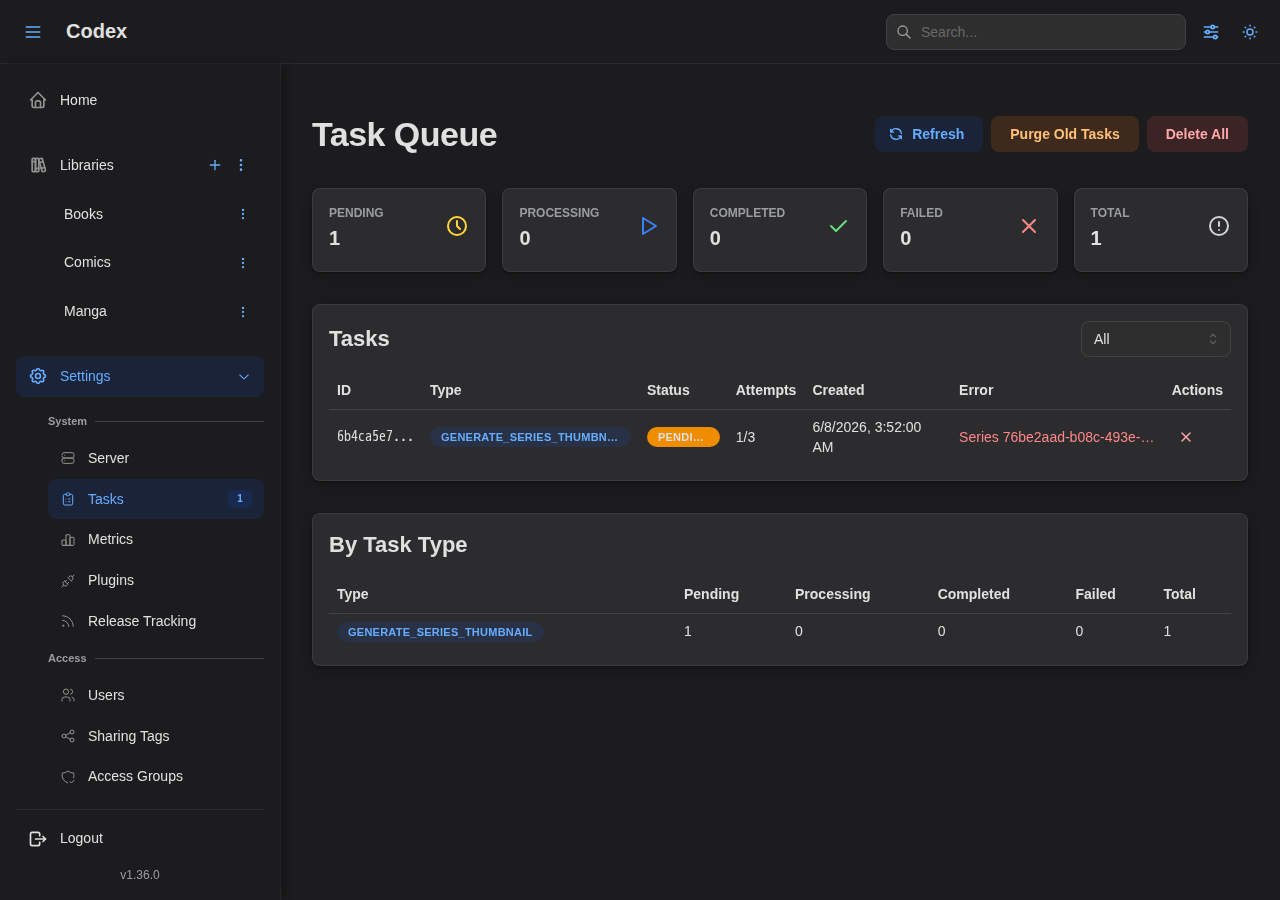
Monitor the Task Queue: Go to Settings > Tasks to view active and pending tasks.
-
Use normal scan for updates: Deep scans re-process everything.
-
Check disk I/O:
iostat -x 1 -
Reduce concurrent scans:
scanner:max_concurrent_scans: 1
Metadata Not Extracted
Symptoms
- Books show with wrong titles
- Series not detected
- Missing author/publisher info
Solutions
-
Add ComicInfo.xml to comics:
<?xml version="1.0"?><ComicInfo><Title>Issue Title</Title><Series>Series Name</Series><Number>1</Number></ComicInfo> -
Run deep scan to re-extract:
curl -X POST "http://localhost:8080/api/v1/libraries/{id}/scan?mode=deep" \-H "Authorization: Bearer $TOKEN" -
Check filename format:
Series Name 001.cbzis better thanrandom_name.cbz
Authentication Issues
Login Failed
Symptoms
- "Invalid credentials" error
- Can't log in after setup
- Token expired errors
Solutions
-
Verify credentials (case-sensitive):
curl -X POST http://localhost:8080/api/v1/auth/login \-H "Content-Type: application/json" \-d '{"username":"admin","password":"yourpassword"}' -
Reset password (via admin):
curl -X PUT http://localhost:8080/api/v1/users/{id} \-H "Authorization: Bearer $ADMIN_TOKEN" \-d '{"password":"newpassword"}' -
Check JWT secret is set:
auth:jwt_secret: "your-secret-here" # Must be set!
API Key Not Working
Symptoms
- "Unauthorized" with valid key
- Key works in curl but not in app
- Permissions denied
Solutions
-
Check key format:
# As headercurl -H "Authorization: Bearer codex_abc123..."# As X-API-Keycurl -H "X-API-Key: codex_abc123..." -
Verify key permissions: Keys can only have permissions the creator has.
-
Check key isn't revoked:
curl http://localhost:8080/api/v1/api-keys \-H "Authorization: Bearer $TOKEN"
SSE (Real-Time Updates) Issues
Events Not Received
Symptoms
- Progress not updating in real-time
- Scan status shows "unknown"
- No notifications for new books
Solutions
-
Check SSE connection (browser DevTools):
- Network tab > filter "stream"
- Status should be 200 (pending)
-
Verify authentication: SSE streams require valid auth token.
-
Check reverse proxy config:
# Nginx - disable buffering for SSEproxy_buffering off;proxy_cache off;
SSE Disconnecting Frequently
Symptoms
- Connection drops every 30 seconds
- "Reconnecting..." messages
- Inconsistent updates
Solutions
-
Extend timeout in reverse proxy:
proxy_read_timeout 86400s;proxy_send_timeout 86400s; -
Check keep-alive settings: Codex sends keep-alive every 15 seconds.
-
Update to latest version: Recent fixes improved SSE reliability.
Docker Issues
Container Won't Start
Symptoms
- Container restarts repeatedly
- "Exited with code 1"
- Health check failing
Solutions
-
Check logs:
docker compose logs codex -
Verify dependencies:
docker compose ps# postgres should be healthy before codex starts -
Check resources:
docker system df# Ensure disk space available
Port Conflicts
Symptoms
- "Port already in use"
- Can't access Codex
Solutions
-
Find conflicting process:
lsof -i :8080lsof -i :5432 -
Change ports in docker-compose:
ports:- "8081:8080" # Map to different host port
Volume Permission Issues
Symptoms
- "Permission denied" errors
- Can't write to data directory
- Scan can't read files
Solutions
-
Check host permissions:
ls -la /path/to/library -
Run as correct user (Linux):
services:codex:user: "1000:1000" # Match host user
Frontend Issues
Page Not Loading
Symptoms
- Blank page
- JavaScript errors
- API calls failing
Solutions
-
Check API is responding:
curl http://localhost:8080/api/v1/auth/me \-H "Authorization: Bearer $TOKEN" -
Clear browser cache: Hard refresh: Ctrl+Shift+R
-
Check browser console for errors.
Images Not Loading
Symptoms
- Covers show placeholder
- Pages don't display
- 404 errors for images
Solutions
-
Check thumbnail directory:
ls -la ./data/thumbnails/ -
Verify file permissions: Codex needs write access to thumbnail cache.
-
Regenerate thumbnails: Run a scan to regenerate missing thumbnails.
Plugin Issues
Codex supports external plugins for metadata providers and other integrations. Plugins run as separate processes managed by Codex.
Plugin Won't Start
Symptoms
- "INIT_ERROR" health status
- Plugin shows as disabled
- "Command not found" error
Solutions
-
Verify the command exists:
# Test the command directly/path/to/plugin/command --version# For Node.js pluginsnode /path/to/plugin/index.js -
Check working directory: If the plugin expects to be run from a specific directory:
# In plugin configurationworkingDirectory: /opt/codex/plugins/my-plugin -
Verify arguments: Plugin arguments must be valid. Test manually:
node /path/to/plugin/index.js arg1 arg2 -
Check Docker permissions: If running in Docker, ensure the plugin command is available inside the container.
Plugin Auto-Disabled
Symptoms
- Plugin health shows "disabled"
- "disabled_reason" shows failure count exceeded threshold
- Red status badge on plugin row
Recovery Steps
-
Go to Settings > Plugins
-
Review the failure history:
- Click the expand arrow on the plugin row
- Check the "Failure History" section
- Look at error codes and messages
-
Fix the underlying issue:
TIMEOUT: Plugin took too long; check network or increase timeoutRATE_LIMITED: External API throttling; reduce request rateAUTH_FAILED: Invalid credentials; update API keyRPC_ERROR: Plugin returned an error; check plugin logsPROCESS_CRASHED: Plugin crashed; check command/args
-
Reset failures:
- Click the "Reset Failures" button (refresh icon)
- This clears the failure counter
-
Re-enable the plugin:
- Toggle the "Status" switch to ON
- Codex will attempt to start the plugin
Rate Limit Errors
Symptoms
- "RATE_LIMITED" error code
- Requests rejected before reaching plugin
- Plugin health showing "degraded"
Solutions
-
Reduce request rate in plugin settings:
rateLimitRequestsPerMinute: 30 # Lower than default 60 -
Check external API limits: External providers (AniList, MangaUpdates, etc.) have their own rate limits. Configure Codex's rate limit to stay well below external limits.
-
Stagger bulk operations: For bulk metadata operations, consider processing in smaller batches.
Invalid Credentials
Symptoms
- "AUTH_FAILED" error
- Plugin can't access external API
- 401/403 errors in failure history
Solutions
-
Update credentials:
- Go to Settings > Plugins
- Click Edit on the plugin
- Go to "Credentials" tab
- Enter new credentials as JSON
-
Check credential format:
{"api_key": "your-actual-api-key"} -
Verify credential delivery: Plugins can receive credentials via:
env: Environment variables (most common)config: In the config JSONstdin: Via standard input
Plugin Timeout
Symptoms
- "TIMEOUT" error code
- Operations taking too long
- High latency in health checks
Solutions
-
Check plugin health:
- Is the external API slow?
- Is there network latency?
-
Increase timeout (if using custom plugin): Default timeout is 30 seconds. For slow APIs, consider:
- Implementing caching in the plugin
- Processing requests asynchronously
-
Check network connectivity:
# From Docker containerdocker compose exec codex curl -I https://api.example.com
Viewing Plugin Logs
For detailed debugging:
-
Check Codex logs for plugin-related messages:
docker compose logs | grep -i "plugin" -
Check plugin process output: Plugin stdout/stderr may be captured in logs.
-
Enable debug logging:
CODEX_LOGGING__LEVEL=debug docker compose up
Common Error Codes
| Error Code | Description | Common Fixes |
|---|---|---|
INIT_ERROR | Plugin failed to start | Check command, args, working directory |
TIMEOUT | Request exceeded time limit | Check network, reduce payload size |
RATE_LIMITED | Too many requests | Reduce rate limit setting |
AUTH_FAILED | Authentication failed | Update credentials |
RPC_ERROR | Plugin returned an error | Check plugin logs, fix plugin code |
PROCESS_CRASHED | Plugin process died | Check command, memory, dependencies |
PROTOCOL_ERROR | Invalid JSON-RPC response | Plugin SDK mismatch, update plugin |
Getting Help
If you're still experiencing issues:
Check Server Metrics
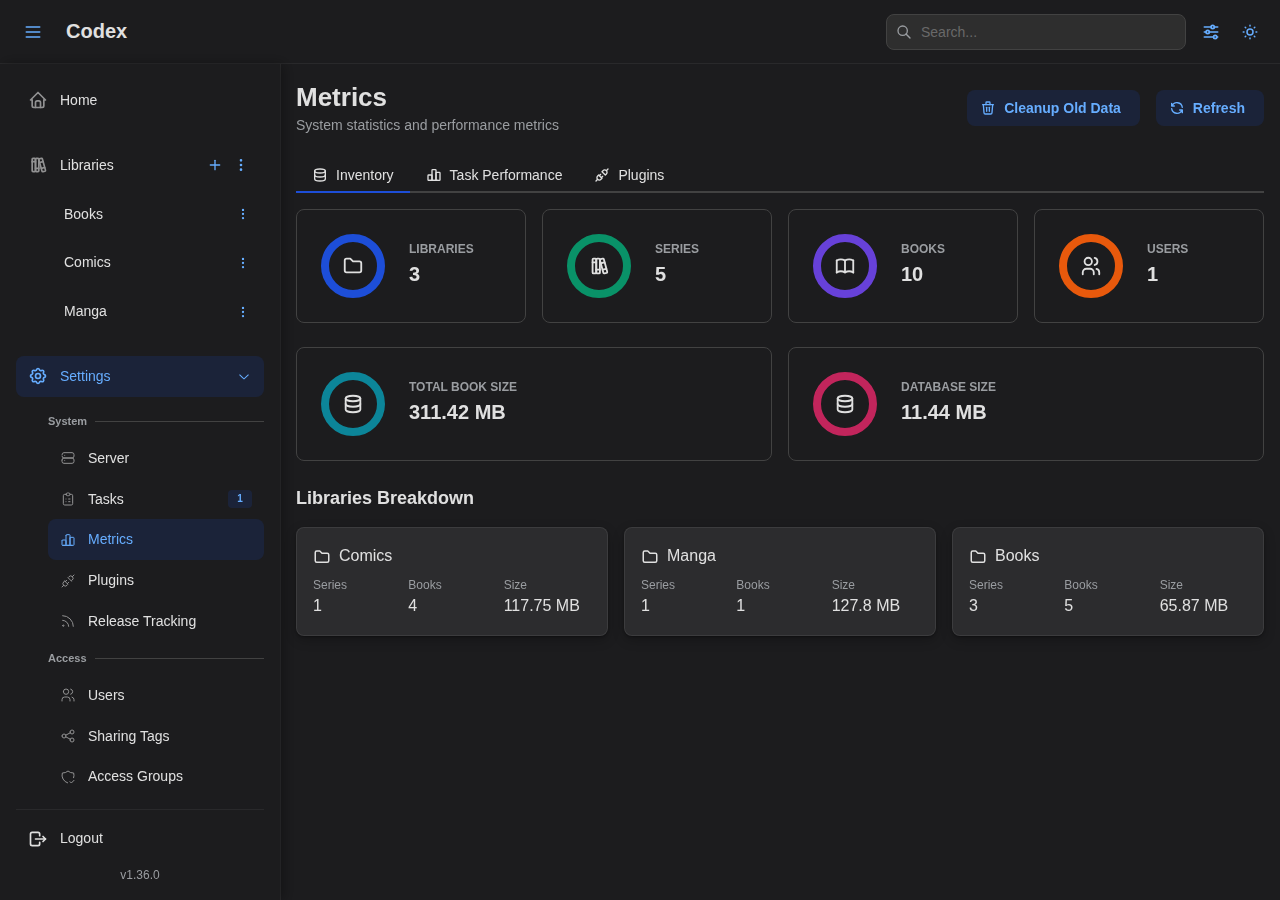
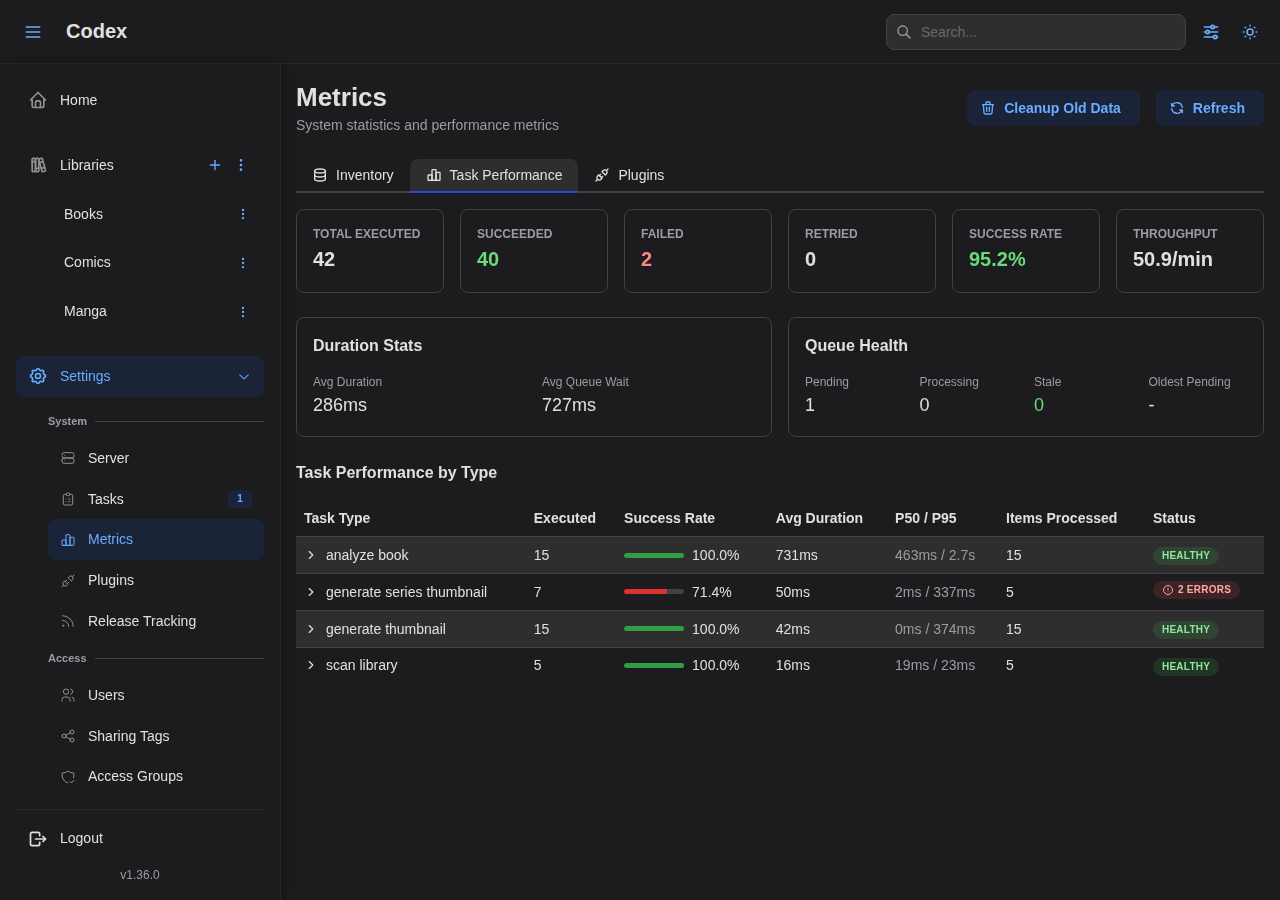
Go to Settings > Metrics to view server statistics including inventory counts and task history.
Gather Information
-
Codex version:
codex --version -
Full logs:
docker compose logs > codex-logs.txt -
Configuration (redact secrets):
cat codex.yaml -
System info:
docker versionuname -a
Report Issues
- Issues
- Include:
- Steps to reproduce
- Expected vs actual behavior
- Logs and configuration
- System information